完璧な印刷のためのオールインワンPDF面付けソフトウェア
小冊子、ギャングシート、N-upレイアウトなど70以上のプリプレスツールをブラウザ上でライブに。インストール不要、プラグイン不要、ファイルのアップロードも不要。
PDF・画像・CSV・Excel。ファイルは端末内に保持されます。
- インストール不要
- 100%ブラウザベース
- Acrobatプラグイン不要
- どこでも動作
- 安全・プライベート
- 無料で開始


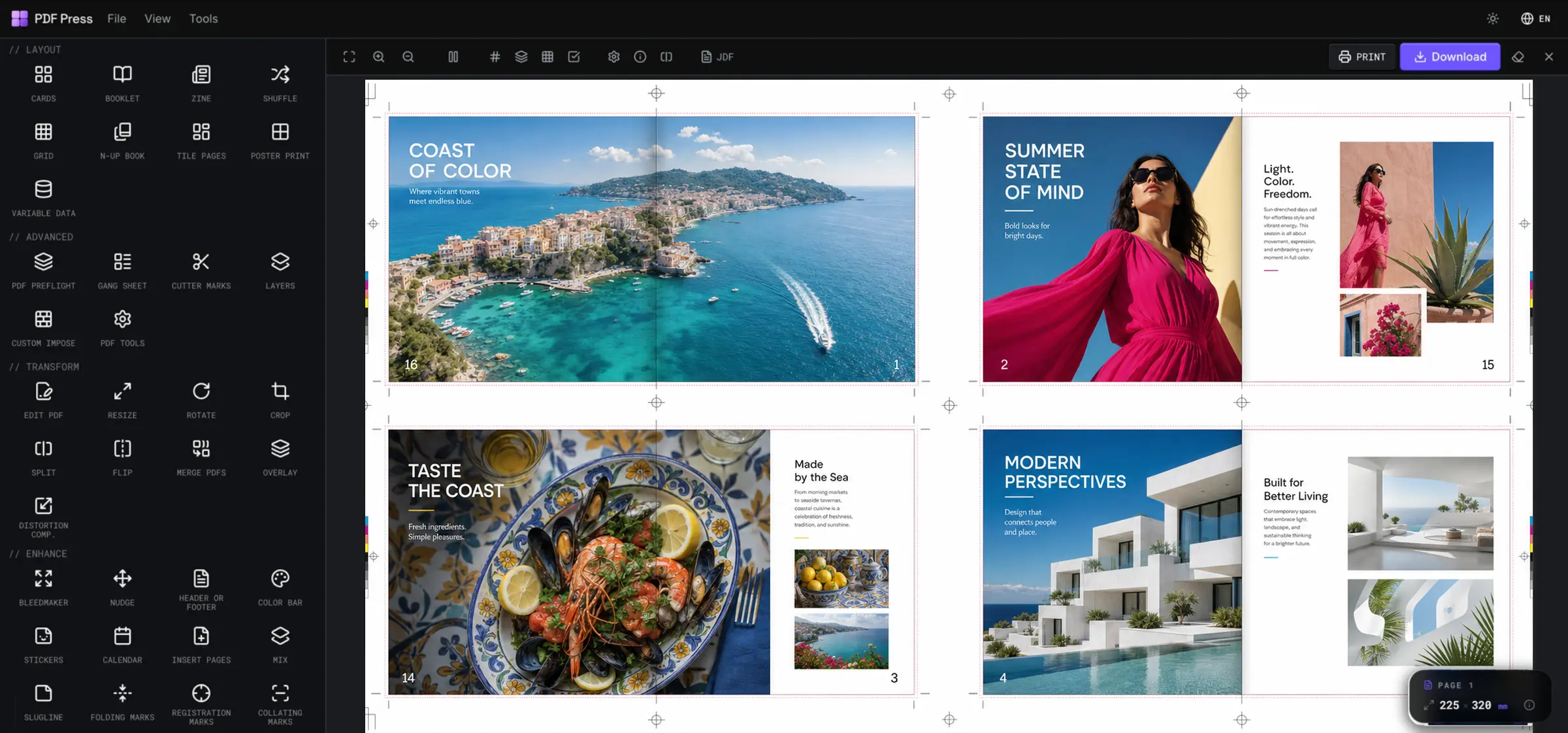
すべてのプリプレスツールを、 ひとつのワークフローで。
小冊子、ギャングシート、N-upブック、シャッフル、タイル分割など、印刷に必要なあらゆる面付けをひとつの場所で。プラグイン不要。ダウンロード不要。印刷に完璧なPDFを。
どんな  PDFも印刷可能な刷り台
  に。冊子
に。冊子  ・N-upカード
  ・ラベル
・ラベル  ・ギャングシートをトンボ・裁ち落とし・カラーバー付きで面付け。ブラウザだけで、インストールも待ち時間も不要
  。
。
あらゆる印刷制作に対応する70以上のツール
面付けから印刷マークまで。ツールを検索するか、すぐに始めましょう。

時間を節約
何時間もの手作業の面付けを数秒で自動化。

ミスを削減
印刷前にすべてのシートをライブでプレビュー。

印刷準備完了
トンボ、塗り足し、カラーバー。印刷に完璧な出力。

どこからでも
Mac・Windows・Linuxのブラウザで動作。

ファイルは安全
すべてローカルで処理。何もアップロードされません。
世界中のデザイナーや印刷会社が面付けに利用
面付けされたPDF + ツール使用回数
AIに頼む: これを5 × 5 cmの名刺に変換して; シートに3 × 3で並べて; 中綴じ冊子として面付けして; 4面付けレイアウトを作って; ページを二つ折りのzineにして; ステッカーシートをステップ&リピートして; 3 mmの塗り足しとトンボを追加して; 用紙サイズをA3にして; カスタム面付けを作って.
あらゆる印刷ジョブのために
小さなコピーショップからパッケージ製造ラインまで、PDF Press は各ジョブに必要な面付けを行い、印刷可能な PDF を書き出します。
印刷会社・コピーセンター
デジタル機やオフセット機向けに、冊子・N-up・ギャング面付けを作成。トンボやクリープも自動で処理します。
面付けソフト
イベント・会場運営
連番やQRコード付きのチケット・パス・リストバンドを、表計算データから可変印刷でそのまま印刷できます。
チケット印刷
ラベル・ステッカー印刷
1つのラベルをシート全体に正確な間隔とトンボ付きでステップ&リピート。型抜きの準備も万全です。
ステップ&リピート
デザイン・マーケティング
名刺・チラシ・パンフレットを1枚のシートに多面付け。きれいに断裁され、そのまま印刷に使えます。
カード面付け
学校・教会・クラブ
式次第やニュースレターを、正しい順序で折って綴じられる中綴じ冊子に変換します。
冊子面付け
ZINE・個人出版
1枚のシートから8ページのミニZINEを作成。ページは自動で並び替えられ、1回の印刷・折り・断裁で完成します。
ZINEを作るPDF を面付けする方法
PDF を面付けするには、印刷会社が必要とする正確な順序と位置で、各ページをより大きな印刷用紙に配置します。PDF Press はそれをブラウザー内で直接行います。レイアウトを選び、マークと裁ち落としを設定し、シートをプレビューして、印刷可能なファイルを書き出します。
PDF を追加
ブラウザーで PDF Press を開き、面付けしたい PDF または画像を追加します。
面付けレイアウトを選ぶ
冊子、N-up グリッド、ステップ&リピートを選び、カード・ラベル・ステッカーをまとめます。
シートの詳細を設定
ページサイズ・余白・ノド・裁ち落としを選び、トンボ・カットマーク・見当トンボを追加します。
プレビューと書き出し
印刷用紙のライブプレビューを確認し、ページ順を直してから、ローカル処理・アップロードなしで印刷可能な PDF を書き出します。
プリプレス・印刷チームに愛されています
Quite Imposing、pdfsnake、Imposition Wizard などのデスクトップ面付けソフトから PDF Press に乗り換えた、デザイナー・コピーセンター・印刷会社の声です。
長年 Acrobat 上で Quite Imposing を使ってきました。PDF Press は同じ冊子や N-up の面付けをブラウザだけで行えます。プラグインも席数ライセンスも不要で、しかもセットアップが本当に速いです。
冊子印刷に使えるブラウザツールでは、これが一番です。中綴じ、無線綴じの折丁、ページの自動面付け。ZINE やカタログのお客様も納期に大喜びです。
チームごと pdfsnake から移行しました。ステップ&リピートや集版の作業は同じですが、ライブプレビューのおかげで、クリープや裁ち落としの問題を刷版の前に気づけます。後からではなく。
リソグラフで ZINE を刷っていますが、面付けがいつも大変でした。PDF Press は中綴じ冊子印刷用に ZINE のページを数秒で面付けしてくれます。ページ順もクリープも全部です。
中綴じ冊子の面付けは、プリプレスの中でも一番苦手な作業でした。今はレイアウトを選んでライブプレビューを見るだけ。これまで使った中で間違いなく一番簡単な面付けツールです。
一日中ステッカーシートを面付けしています。アートワークを置いてグリッドを設定し、トンボを足すだけ。以前は Illustrator のスクリプトが必要だった N-up のステッカー面付けが、今はワンクリックです。
以前は Imposition Wizard や Montax を試していました。PDF Press は速さで勝ります。タブを開いて PDF を置くだけで、トンボと裁ち落としがもう必要な位置に入っています。
チラシやポストカードのグリッド印刷がとても簡単になりました。行と列を指定すれば、裁ち落としと見当トンボ付きで PDF を刷版用紙に N-up してくれて、印刷会社にそのまま渡せます。
カスタム面付けの自由度こそ、使い続けている理由です。変則的なページサイズ、混在する向き、独自のグリッド。以前のツールが断っていたカスタム面付けの仕事も PDF Press はこなします。
Popular imposition guides & tools
The tutorials, comparisons and free tools print pros reach for most — impose, add bleed, fold and print with confidence.
Free imposition software
Impose booklets, N-up and cards in your browser — no upload, no install, press-ready export processed locally.
Read the guideAdd bleed to PDF
Extend artwork past the trim edge with fixed or mirrored bleeds — turn a trim-size file print-ready in your browser.
Open the toolFree imposition software for Mac
Skip Windows-only plugins and risky downloads — impose booklets, N-up and gang sheets on Mac, free and in-browser.
Read the guideBest imposition software 2026
Compare 2026 tools for digital and offset: booklets, N-up, step-and-repeat, crop marks and automation.
Read the guideHow to impose a PDF
A step-by-step tutorial covering booklet, N-up and gang imposition for print-ready output with free online tools.
Read the guideCut & stack PDF
Order pages for cut-and-stack production so sequential tickets, coupons and forms collate correctly after cutting.
Open the toolStep & repeat PDF
Repeat one artwork across a press sheet for labels, cards, stickers and short-run print jobs.
Open the toolHow to make a zine
Half-fold, quarter-fold and 8-page mini zines with the correct page order and printer spreads. No install.
Read the guideTile a large-format PDF
Split a poster across many printable pages with overlap and margins, then print it on a home printer.
Read the guideImposition plugin for Acrobat?
Why there is no good free Acrobat plugin — and how to impose any PDF free in the browser with none at all.
Read the guideFree PDFSnake alternative
Browser-based, client-side imposition for booklets, N-up, step & repeat and gang sheets — no signup, no upload.
Read the guideいつでも始められます
次の案件をブラウザーで面付け
PDF をドロップし、レイアウトを選び、マークと裁ち落とし付きの印刷可能なシートを書き出します。インストール不要、アップロード不要、アカウントなしで始められます。
よくある質問
How PDF Press compares to the imposition software market
デスクトップ面付けプラグインの機能をブラウザ向けに再設計。常に最新、誰にでも手頃な価格。
| Feature | PDF Pressベストチョイス | Quite Imposing Plus | Kodak Preps | EFI Fiery Impose | Adobe Acrobat Pro |
|---|---|---|---|---|---|
| 100% browser-based | |||||
| Nothing to install | |||||
| Works on Mac, Windows, Linux & Chromebook | Mac / Win | Mac / Win | Mac / Win | Mac / Win | |
| No Adobe Acrobat or plug-in required | |||||
| Booklets, N-up & step-and-repeat | |||||
| Crop, bleed & cutter marks | |||||
| Variable data printing | |||||
| 70+ production tools | 70+ | Limited | Limited | Limited | Basic |
| Automatic updates (no paid upgrades) | |||||
| Pricing | Free, then $120/yr | $949 + Acrobat | $$$$ | $$$$ | ~$240/yr |
Feature comparison based on each vendor's public product and pricing pages (checked 2026). PDF Press is our own product; competitor names are trademarks of their owners.