 pdfpress
Montax Imposer Perfect Binding: Review + an Easier Alternative
A look at Montax Imposer for perfect-binding imposition — how it builds signatures, its strengths and limits (Windows-only Acrobat plugin), and a short review. Plus PDF Press, which imposes perfect-binding signatures free in the browser.
How Montax Imposer Does Perfect Binding
Perfect binding builds a book from signatures — folded sections (often 8, 16 or 32 pages) that are gathered in order and glued at the spine, then trimmed. Unlike saddle stitch (nested and stapled), perfect-bound sections sit side by side, so the imposition has to produce correctly ordered, correctly folded signatures.
Montax Imposer handles this: you set the signature size, the fold scheme, creep within each folded section, and a spine allowance for the glue edge. It then lays out each signature so that after folding, gathering and gluing, the pages read in order. It's a genuinely capable tool for book work, which is why it has a loyal following among small publishers and print shops.
The distinction from saddle stitch is worth being precise about, because the imposition logic differs. In saddle stitch, every folded sheet nests inside the next and the whole book is stapled through a single spine fold, so the imposition pairs the outermost page with the innermost across the entire page count. In perfect binding, each signature is folded and trimmed as an independent block, and the blocks are stacked side by side before the spine is ground flat and glued. That means perfect binding can carry far more pages — hundreds, where saddle stitch becomes impractical past roughly 64 — and it produces a flat, printable spine. The cost is a more involved imposition: the tool must build each signature correctly on its own and then sequence the signatures so the gathered stack reads continuously.
Perfect binding gathers folded signatures glued at the spine — imposition must order and fold each section correctly.
Do it in your browser — the sheet, the count and the marks are set for you. Change only what you want.
Open the booklet tool5 free downloads total · 8 hours between free downloads · local file processing
Montax Imposer Review: Strengths and Limits
Strengths. Montax Imposer is feature-rich and affordable relative to high-end prepress suites, with solid N-up, booklet, cut-and-stack and perfect-binding signature support. For a Windows shop already running paid Acrobat, it adds capable imposition without a five-figure price tag.
Limits to weigh.
- Windows-only — no macOS build.
- Acrobat plugin for older paid Acrobat — not Acrobat Reader, and unreliable/unsupported on current Acrobat DC (see Montax not working in Acrobat DC).
- Machine-locked license — moving computers requires deactivation/reactivation.
- Trial/free cap — the free or trial edition has a page/feature cap and shows "you've exceeded the limit of this program version" when crossed; removing it requires a paid license.
- Some users report occasional bugs/glitches.
Verdict. A good-value imposition plugin if you're on Windows with the right Acrobat. If you're on a Mac, on Acrobat DC, moving between machines, or hitting the trial wall, the environment constraints can outweigh the price advantage.
Signatures, Folding and Creep in Perfect Binding
A signature is a single sheet folded into a section of 8, 16 or 32 pages, and perfect binding gathers these folded sections side by side before grinding the spine and gluing them into the cover. The imposition tool's job is to place each page so that, after the fold scheme is applied, every signature reads in order from its first leaf to its last.
The fold scheme dictates the page positions. An 8-page signature is a single sheet folded twice; a 16-page signature is folded three times; a 32-page signature is folded four or five times depending on the folder. Each fold halves the sheet, so the page numbering follows a fixed pattern that the imposer reverses — page 1 must sit next to page 16 on the flat sheet of a 16-page section so they end up adjacent after folding. Montax computes this from the signature size and fold count you choose.
Creep (also called push-out or shingling) is the small outward shift of inner pages caused by paper thickness as sheets nest or stack. In a thick signature, the innermost leaves stick out slightly when folded, so trimming a flush edge would crop more from the inner pages than the outer ones. Creep compensation nudges page content inward toward the spine on inner leaves so the trimmed margins stay even. The shift per leaf is roughly half the paper caliper accumulated across the fold; for a 16-page signature on 100 gsm stock the total creep is small but visible, and on heavy stock it becomes significant. Perfect binding generally shows less creep than saddle stitch because sections sit side by side rather than all nesting, but each individual signature still folds and still creeps internally.
Spine Allowance, Stock and Binding Choice
The spine allowance in perfect binding is the width of glued edge plus the grind-off, and the spine width of the finished book equals the page count multiplied by the paper caliper, divided by two for double-sided pages. Getting this number right determines whether the cover artwork lines up with the actual book block.
Spine width is a direct calculation: total pages divided by 2, multiplied by the sheet caliper. A 200-page book on 0.10 mm (100 micron) stock has 100 leaves, giving a spine of about 10 mm before the cover board is added. Underestimate it and the cover text wraps onto the front; overestimate it and the spine looks loose. Perfect binding also needs 3 to 5 mm of the inner margin ground off and glued, so keep content out of that gutter zone, and many binders ask for an extra few millimetres of hinge score near the spine so the cover opens flat.
Stock choice interacts with the binding method, which is why the perfect-binding-versus-saddle-stitch decision is usually settled by page count and paper:
| Factor | Saddle stitch | Perfect binding |
|---|---|---|
| Page count must be a multiple of | 4 | Signature size (8 / 16 / 32) |
| Practical page range | up to ~64 pages | ~48 pages and up |
| Spine | Folded, no flat spine | Flat glued spine, printable |
| Creep | Pronounced (all sheets nest) | Per-signature only |
| Lies flat when open | Yes | Less so without a hinge score |
As a rule of thumb, books under about 64 pages on lighter stock suit saddle stitch, while thicker books and anything needing a printable spine go perfect bound. Whichever you choose, the imposition must order, fold and creep-compensate each signature correctly, and the page total must hit the right multiple — pad with blanks at the end of the final signature if it does not.
Spine width equals pages divided by two times the sheet caliper — the cover artwork has to match the book block.
Do it in your browser — the sheet, the count and the marks are set for you. Change only what you want.
Open the booklet tool5 free downloads total · 8 hours between free downloads · local file processing
An Easier Alternative: PDF Press
PDF Press imposes perfect-binding signatures — and saddle stitch, n-up and cut-and-stack — in the browser with a live preview and no Acrobat, no Windows requirement and no machine-locked license.
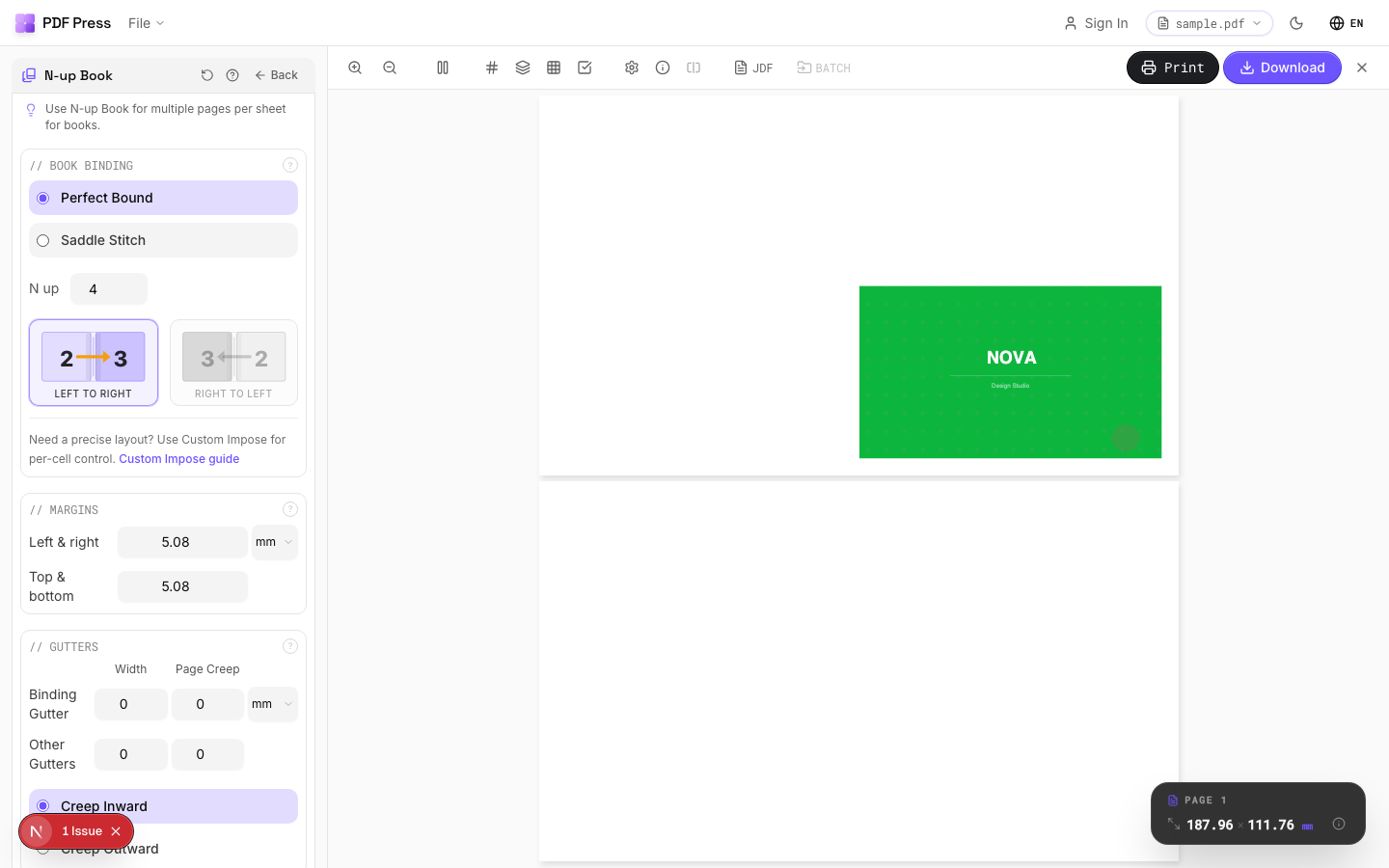

Use N-up Book for perfect-binding signatures, Booklet maker for saddle stitch, plus Cut and stack and N-up, with bleed and marks.
The workflow mirrors what you would do in Montax, minus the install and licence steps: drop in the exported book PDF, choose the signature size that matches your folder (8, 16 or 32 pages), set the creep value for your stock, and add the spine allowance and any hinge score the binder needs. The live preview then shows the folded sections so you can confirm the page order and the trim margins before committing paper. Because the tool runs in the browser and processes files locally, there is no machine-locked seat to release when you move computers and no trial page cap to hit mid-job — the two friction points that most often push Montax users to look for an alternative.
For book work specifically, the page-count discipline still applies: a perfect-bound title must pad to a clean multiple of its signature size, with blanks placed at the end of the final signature so they fall after the content rather than inside it. PDF Press handles that padding automatically, so a 188-page manuscript built from 16-page signatures is rounded to 192 without you doing the arithmetic, and the preview shows exactly where the four blank leaves land.
Pros vs Montax Imposer: any OS (incl. Mac), no Acrobat, no machine-locked license, no trial page cap, live preview, free to start. Cons: Montax has some Windows/Acrobat-integrated and niche commercial options a browser tool doesn't replicate. To choose a binding method, see perfect binding vs saddle stitch; compare directly in PDF Press vs Montax Imposer and the full Montax Imposer alternative.
Windows-only Acrobat plugin with a trial cap vs. a free, any-OS browser tool for signatures.
Do it in your browser — the sheet, the count and the marks are set for you. Change only what you want.
Open the n up tool5 free downloads total · 8 hours between free downloads · local file processing
Frequently Asked Questions
Does Montax Imposer do perfect binding?
Is Montax Imposer good? (Short review)
What signature sizes does perfect binding use?
Is there a Mac or browser alternative to Montax Imposer for perfect binding?
How do I calculate the spine width for a perfect-bound book?
What is creep and why does it matter in perfect binding?
Ready to put this into practice?
Do it in your browser — the sheet, the count and the marks are set for you. Change only what you want.
Open the n up toolFree in your browser · sign in with Google · files never leave your device