 pdfpress
DevaliPI Imposition Studio Alternative: Modern Browser-Based Comparison
Looking for a DevaliPI Imposition Studio alternative? Compare v10 features, Windows and macOS downloads, one-time pricing, VDP, hot folders, and PDF Press browser workflows.
What Is DevaliPI Imposition Studio?
DevaliPI Imposition Studio is a professional desktop PDF imposition application for digital and offset print production. Developed by Devalipi Software FZE, the current v10 product line supports Windows and macOS, offers a 7-day full-feature trial, and publishes transparent one-time license pricing.
Prefer a side-by-side? See our PDF Press vs Imposition Studio comparison with an interactive cost calculator.
At its core, Imposition Studio arranges PDF pages onto press sheets for efficient printing. But it goes far beyond basic n-up layouts. The software supports variable data printing (VDP), advanced gang-up optimization, signature-based imposition for book production, automated batch processing, and tight integration with RIP (Raster Image Processor) workflows. For large-format offset shops that process thousands of files per week, DevaliPI provides the kind of industrial-grade automation that keeps presses running.
Imposition Studio's primary audience is commercial print operations: offset houses, packaging converters, book manufacturers, and large-format digital shops. The software was designed from the ground up for operators who think in terms of plates, signatures, gripper edges, CTP output, and running spoilage — prepress professionals who need every parameter exposed and configurable.
Release notes, download, edition, and pricing pages also give DevaliPI useful SEO surface area. Google can index pages around "Imposition Studio v10", "imposition studio download", "imposition studio price", and "imposition studio for Mac" instead of relying on a single generic homepage.
If you have landed on this page, you are likely in one of three situations: you are evaluating DevaliPI for the first time, you are already using it and exploring alternatives, or you searched for "imposition studio download" looking for a quick solution. This guide covers all three scenarios and provides an honest, detailed comparison with PDF Press — a modern, browser-based imposition tool that takes a fundamentally different approach to the same problem.
Move your Devalipi imposition workflow into the browser — booklet, N-up, gang, and marks, nothing to install.
Do it in your browser — the sheet, the count and the marks are set for you. Change only what you want.
Open the online imposition toolFree in your browser · sign in with Google · files never leave your device
DevaliPI's Strengths: Where It Excels
A fair comparison requires acknowledging what DevaliPI does well. Imposition Studio is a powerful tool, and there are legitimate use cases where it remains the right choice. Here is what it brings to the table:
Variable Data Printing (VDP)
DevaliPI's VDP support is one of its strongest differentiators. The software can merge variable data fields — names, addresses, barcodes, serial numbers — directly into imposed layouts. For print shops producing personalized direct mail, event badges, lottery tickets, or serialized packaging, this integration eliminates an entire step in the workflow. The VDP engine handles complex data merges across multi-page documents without requiring a separate composition tool.
Offset and Digital Print Support
Imposition Studio was built with offset printing in mind. It understands plate layouts, work-and-turn, work-and-tumble, sheetwise, and perfecting press configurations. Signature planning for 4-up, 8-up, 16-up, and 32-up layouts follows traditional bindery conventions. At the same time, the software handles digital print workflows with step-and-repeat, gang-up, and cut-and-stack patterns that modern toner and inkjet presses demand.
Advanced Gang-Up Optimization
For shops that combine multiple jobs onto a single press sheet, DevaliPI's gang-up engine provides sophisticated optimization. It considers different item sizes, quantities, paper waste, and cutting patterns to produce layouts that maximize sheet utilization. The algorithm accounts for binding margins, bleed overlap, and post-press finishing requirements — details that simpler gang-up tools often miss.
Batch Processing and Automation
Production environments need automation. DevaliPI supports hot folder watching, scripted workflows, and command-line execution for unattended batch processing. Drop a PDF into a watched folder, and the software applies a predefined imposition template, processes the file, and outputs the imposed sheet to a designated location — all without operator intervention. For shops processing hundreds of files daily, this automation is essential.
Comprehensive Mark Toolkit
Beyond basic crop marks, DevaliPI offers a full suite of print production marks: registration marks, color bars, fold marks, collation marks, signature marks, plate identification, and custom slug-line text. These marks follow industry standards and can be configured per-template for different press and finishing requirements.
JDF/JMF Integration
For shops running JDF-based workflow systems (such as EFI Fiery, Heidelberg Prinect, or Kodak Prinergy), DevaliPI can read and write JDF job tickets. This integration allows imposition parameters to flow directly from the MIS (Management Information System) to Imposition Studio, reducing manual setup and potential errors.
DevaliPI's Limitations: Where It Falls Short
Despite its power, DevaliPI Imposition Studio has significant limitations that increasingly push users toward alternatives. These are not minor inconveniences — they are structural constraints that affect daily usability:
Desktop-Only Workflow
Imposition Studio now supports current versions of both Windows and macOS, which is a stronger cross-platform story than many legacy desktop imposition tools. The limitation is that it is still a desktop installer with no browser version, no ChromeOS workflow, no iPad workflow, and no Linux build. If your team needs to impose PDFs from shared workstations, tablets, or locked-down machines where installers are not allowed, a browser workflow is still simpler.
Steep Learning Curve
DevaliPI exposes hundreds of parameters across deeply nested dialog boxes. For experienced prepress operators who have been using the software for years, this depth is a feature. For new hires, freelancers, or designers who need to impose a PDF occasionally, it is overwhelming. The interface reflects industrial software design conventions from a previous era — functional, but not intuitive. Training time is measured in days, not minutes.
Commercial One-Time Licensing
DevaliPI now lists clear one-time license pricing publicly. Digital edition pricing starts at $199 for a single user, with Digital Multi User at $399 and Digital Enterprise at $799. Offset pricing starts at $399 for a single user, with Offset Multi User at $799 and Offset Enterprise at $1,599. That transparency is welcome, but it still means a desktop software purchase, edition choice, update-plan management, and separate VDP add-on decisions.
Dated User Interface
The Imposition Studio interface is functional but visually dated. It follows Windows desktop conventions from the mid-2000s: toolbar icons, modal dialog boxes, menu-driven navigation, and a fixed window layout. While this does not affect the software's capabilities, it creates a jarring experience for users accustomed to modern application design. More importantly, the UI's density makes it harder to find the specific setting you need among dozens of competing options.
No Browser Access
There is no web version of Imposition Studio, no cloud-based alternative from DevaliPI, and no way to access it remotely without setting up Windows Remote Desktop or a similar solution. In 2026, when tools like Figma, Canva, and Google Workspace have normalized browser-based creative workflows, a desktop-only tool with no remote access capability feels like a generation behind.
Preview Limitations
While DevaliPI does provide a preview of imposed layouts, the feedback loop is slower than what modern browser tools offer. Changing a parameter requires navigating to the correct dialog, modifying the value, confirming the change, and then waiting for the preview to regenerate. Compare this to a real-time preview where every slider adjustment instantly updates the visual output — the difference in iteration speed is dramatic.
Overkill for Common Tasks
Most imposition tasks are straightforward: create a booklet, lay out business cards, impose a flyer 2-up. DevaliPI's industrial-grade complexity means even simple tasks require navigating the same complex interface designed for 32-page signature layouts. There is no simplified mode for basic jobs. You pay the full complexity tax regardless of task complexity.
Feature-by-Feature Comparison: PDF Press vs DevaliPI
The following table provides an honest, detailed comparison across the features that matter most for PDF imposition. We have included both tools' strengths and limitations without bias:
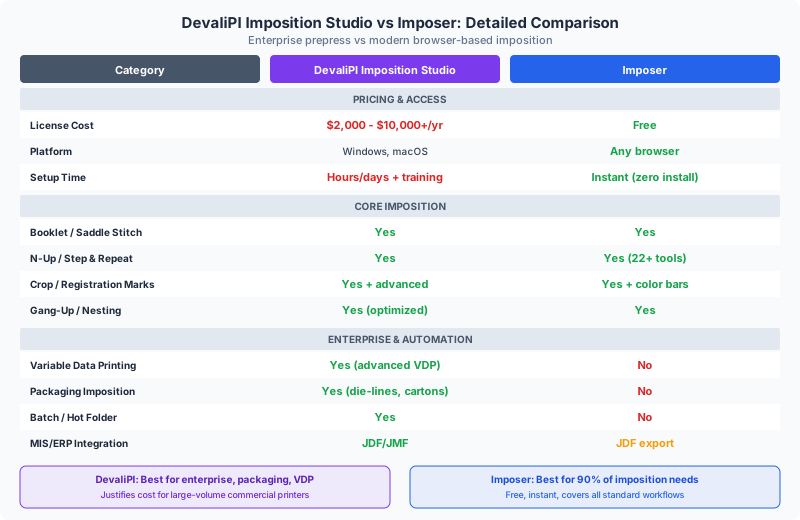
| Feature | PDF Press | DevaliPI Imposition Studio |
|---|---|---|
| Price | Subscription access with all 43 tools, no watermarks, and saved presets | One-time license: Digital $199-$799; Offset $399-$1,599 |
| Platform | Any browser — Windows, Mac, Linux, ChromeOS, iPad | Windows and macOS desktop installers |
| Installation | None — opens in browser tab | Desktop installer required |
| Real-Time Preview | Yes — instant interactive preview on every change | Yes — preview available, slower feedback loop |
| Booklet Imposition | Saddle stitch & perfect binding with creep compensation | Full signature support including nested and gathered |
| N-Up Layouts | Any grid (2, 4, 8, 16, 32-up, custom) | Any grid with advanced sheet-planning options |
| Step-and-Repeat | Full support with auto-scaling | Full support with quantity optimization |
| Gang-Up / Nesting | Gang sheet + sticker nesting (bin-packing) | Advanced multi-job gang-up with waste optimization |
| Crop & Registration Marks | Crop marks, center marks, color bars, cutter marks | Full mark suite including fold, collation, and plate marks |
| Variable Data (VDP) | Not supported | Full VDP with data merge |
| Batch Processing | Single file at a time | Hot folders, scripting, command-line automation |
| JDF Integration | JDF download for imposed output | Full JDF/JMF read and write |
| Work-and-Turn / Tumble | Supported | Full offset press configurations |
| Creep Compensation | Automatic with direction control | Full creep with manual override |
| Page Manipulation | Rotate, flip, crop, resize, nudge, split, shuffle, insert, overlay | Rotate, crop, scale — within imposition context |
| Layer Control | Toggle PDF layers on/off | Limited layer handling |
| Privacy | 100% client-side — files never leave your device | Local desktop processing |
| Tool Count | 23 specialized tools | Integrated into unified interface |
The comparison reveals a clear pattern: DevaliPI wins on industrial features (VDP, batch automation, JDF/JMF, offset configurations), while PDF Press wins on accessibility, cost, platform support, and modern user experience. Your choice depends on which side of that divide your workflow falls on.
Pricing Comparison: What Does Imposition Studio Actually Cost?
One of the most common searches related to DevaliPI is "imposition studio download", "imposition studio free download", and "imposition studio price." This tells us something important: buyers want to try the software, understand edition limits, and see a price before they commit.
DevaliPI Imposition Studio Pricing
DevaliPI now lists pricing clearly on its purchase page, with no price-on-request barrier. As of May 20, 2026, Imposition Studio is sold as a one-time payment with no recurring fees:
- Digital Single User: $199, with 50 cm x 50 cm maximum output and 1 year of free updates.
- Digital Multi User: $399, 3-user license with 2 years of free updates.
- Digital Enterprise: $799, 6-user license with lifetime free updates.
- Offset Single User: $399, no output size restriction, CTP mode, and 1 year of free updates.
- Offset Multi User: $799, 3-user license with 2 years of free updates.
- Offset Enterprise: $1,599, 6-user license with lifetime free updates.
- vdpXpro add-on: $99-$599 depending on Digital/Offset edition and user count.
This is much better than hidden enterprise pricing. The remaining buyer decision is edition fit: Digital editions cap output size and skip CTP mode, while Offset editions remove the size restriction and add offset production options.
PDF Press Pricing
PDF Press uses a simpler subscription model for teams that want browser-based imposition: all 43 tools are included, with no watermarks, no cooldowns, saved presets, and local browser processing. The decision is less about raw feature count and more about workflow: DevaliPI is a deep desktop production suite, while PDF Press is a fast browser workspace for the common imposition jobs most teams repeat every day.
Total Cost of Ownership (3-Year Comparison)
| Cost Component | PDF Press (3 Years) | DevaliPI (3 Years, Estimated) |
|---|---|---|
| Software License | $120/year on annual PDF Press Pro | $199–$1,599 depending on Digital/Offset and user count |
| Annual Maintenance | Included while subscribed | 1 year, 2 years, or lifetime free updates depending on edition |
| Platform Requirement | Any modern browser | Windows or macOS desktop workstation |
| Installation / IT Setup | None | Desktop deployment per machine |
| Training Time | Minutes | Days to weeks |
| Estimated 3-Year Total | $360 over 3 years on annual Pro | $199–$1,599 base license, plus optional VDP/update plans |
For a small digital print shop with 3 operators, the difference is even more dramatic. Three DevaliPI seats could easily cost $2,000–$6,000+ over three years, while PDF Press costs nothing for unlimited users on any device.
For a comprehensive pricing analysis across the entire imposition software market, see our best imposition software in 2026 roundup.
When to Choose DevaliPI Imposition Studio
We believe in honest recommendations. There are situations where DevaliPI Imposition Studio is the better choice:
Large Offset Print Operations
If you run an offset press operation processing hundreds of jobs per day with complex signature layouts, plate planning, and JDF-integrated workflow systems, DevaliPI's industrial automation and deep offset-specific features justify the investment. The software was built for this environment, and it shows.
Variable Data Printing Requirements
If your business depends on variable data — personalized direct mail, serialized documents, data-merged labels — DevaliPI's integrated VDP engine eliminates the need for a separate composition step. This is a genuine capability gap that browser tools have not yet closed. If VDP is central to your workflow, DevaliPI (or similar enterprise tools) is the appropriate choice.
Unattended Batch Processing
Production environments that need hot folder automation, scripted workflows, and command-line batch processing require desktop software that can run unattended. PDF Press is an interactive, browser-based tool designed for one-file-at-a-time workflows. If you need to process 500 files overnight with no operator, DevaliPI's automation capabilities are essential.
Existing JDF Workflow Integration
If your shop already runs a JDF-based production workflow (Prinect, Prinergy, Apogee) and Imposition Studio is integrated into that chain, switching carries real migration risk. The JDF integration represents a significant investment in workflow configuration, and replacing one component affects the entire pipeline.
Regulatory or Compliance Requirements
Some enterprise environments have IT policies that mandate locally installed, vendor-supported software with formal SLAs (Service Level Agreements). If your organization requires a vendor support contract, certified software, and on-premise deployment, DevaliPI's enterprise model fits that requirement better than a browser-based tool.
When to Choose PDF Press Instead
For the majority of imposition users, PDF Press is the better fit. Here are the scenarios where it clearly wins:
Digital Print Shops
Digital print operations — toner, inkjet, wide-format — typically process files one at a time with quick turnaround. The operator receives a PDF, imposes it, and sends it to the RIP. PDF Press's workflow matches this pattern perfectly: upload, configure, preview, download. No batch automation needed because each job is different. The real-time preview eliminates test prints and reduces waste.
Freelance Designers and Small Studios
If imposition is something you do occasionally — preparing booklets for clients, laying out business cards for a local shop, imposing flyers for an event — buying a desktop production suite may be more than you need. PDF Press gives you the common imposition workflows in a browser, and you can access it from any device you happen to be working on.
Mac, Linux, and ChromeOS Users
DevaliPI covers Windows and macOS, but not Linux, ChromeOS, iPadOS, or locked-down machines where desktop installers are not allowed. PDF Press works on every modern operating system through the browser. If your prepress department has a mix of Mac, Windows, Linux, and shared web-only workstations, PDF Press is easier to standardize.
Remote and Distributed Teams
When your team works from multiple locations — office, home, client site — a browser-based tool that requires no installation or VPN access is transformative. Share a link to PDF Press, and any team member can impose a file in seconds. No IT tickets, no software deployment, no license transfers between machines.
Anyone Searching for "Imposition Studio Free Download"
If you are looking for a browser-based imposition tool, PDF Press is exactly what you need. It is not a trial, not a demo, and not a cracked version of commercial software (which is both illegal and dangerous). It is a legitimate, fully-featured imposition tool that is built for professionals. Try it now at pdfpress.app.
Quick-Turnaround Jobs
When a client emails a PDF at 4:45 PM and needs it imposed by 5:00 PM, you do not have time to launch a desktop application, navigate through dialog boxes, and render a preview. Open PDF Press in a browser tab, drag in the PDF, pick your layout, and download. The entire process takes under two minutes for standard jobs.
Learning and Education
Print production students, self-publishing authors, and anyone learning imposition for the first time benefit from PDF Press's visual, interactive approach. The real-time preview provides immediate feedback that builds understanding faster than dialog-box-driven workflows. For educators, a browser-based tool eliminates software licensing headaches for classroom use.
For a comparison with other browser-based imposition tools, see our dedicated guide.
PDF Press's 42 Tools: What You Get in One Browser Workspace
One of the most common reactions from users evaluating PDF Press after DevaliPI is surprise at the breadth of the toolset. Instead of one dense desktop imposition window, PDF Press splits work into focused tools that can be chained together:
Layout Tools
- Cards (N-Up) — Arrange pages in any grid configuration on custom paper sizes
- Grid — Step-and-repeat layouts with precise column/row control
- Booklet — Saddle stitch and perfect binding with automatic page reordering and creep compensation
- N-Up Book — Multi-up signature imposition for book production (2, 4, 8, 16, 32-up)
- Gang Sheet — Multi-file gang-up with bin-packing optimization
- Stickers / Nest — Irregular-shape nesting for stickers, labels, and die-cut items
- Expert Grid — Manual cell-by-cell page assignment for complex custom layouts
- Monkey — Cut-and-stack (shingled) imposition for numbered items
Transform Tools
- Resize — Scale pages to target dimensions with aspect ratio control
- Rotate — Rotate pages by any angle
- Crop — Trim pages to custom dimensions or trim/bleed boxes
- Flip — Mirror pages horizontally or vertically
- Split — Divide pages into multiple tiles
- Shuffle — Reorder pages for custom binding sequences
- Nudge — Fine-position pages with per-page translate and rotate adjustments
- Insert Pages — Add blank or repeated pages at specified intervals
Annotation Tools
- Cutter Marks — Crop marks, registration marks, and finishing guides with presets for thru-cut, kiss-cut, crease, and perforation
- Color Bar — CMYK color control strips for press calibration
- Header or Footer — Text labels with page numbers, file names, and custom text
- Overlay — Merge a second PDF (watermark, template, die-line) onto every page
- Toggle Layers — Show or hide PDF layers before imposition
Pipeline Architecture
What makes PDF Press uniquely powerful is that these tools can be chained together. Add a Resize step, then a Booklet step, then Cutter Marks — the pipeline processes each operation in sequence, and the real-time preview shows the final result. This composability means you can build complex prepress workflows from simple building blocks, without the monolithic complexity of DevaliPI's unified interface.
Migration Guide: Switching from DevaliPI to PDF Press
If you are currently using DevaliPI Imposition Studio and want to evaluate or switch to PDF Press, here is a practical migration path. The good news: there is nothing to migrate. Your PDF files work identically in both tools.
Step 1: Identify Your Most Common Jobs
Before switching, catalog the imposition tasks you perform most frequently. For most shops, 80% of jobs fall into a handful of patterns: booklets, n-up business cards, flyer step-and-repeat, poster tiling, or simple 2-up layouts. These are exactly the tasks PDF Press handles best.
Step 2: Run Parallel Tests
Pick 5–10 representative jobs from your recent production and run them through both tools. Compare the output: page order, positioning, mark placement, and final dimensions. This side-by-side validation builds confidence before committing to a switch. Since PDF Press is available, there is affordable to running these tests.
Step 3: Recreate Your Templates
If you use saved templates in DevaliPI, recreate the equivalent configurations in PDF Press. PDF Press supports saved recipes that preserve your tool chain and all parameter values. Set up your most-used configurations once, and they are available for future jobs with a single click. Recipes are stored in your browser or (optionally) synced to the cloud.
Step 4: Transition Common Jobs First
Start by routing simple, high-frequency jobs through PDF Press while keeping DevaliPI available for complex or edge-case work. Most shops find that within a week, 70–90% of their imposition work has naturally migrated to PDF Press simply because it is faster and easier.
Step 5: Evaluate Remaining Dependencies
After two to four weeks of parallel use, evaluate what (if anything) still requires DevaliPI. The most common remaining dependencies are:
- Variable data merging — If you need VDP, you will likely keep DevaliPI (or a dedicated VDP tool) for those specific jobs
- Batch automation — If you process hundreds of files unattended, DevaliPI's hot folders remain necessary
- JDF pipeline integration — If Imposition Studio is a component in a larger JDF workflow, replacing it affects the whole chain
For everything else, PDF Press handles the work faster, on any platform, .
Step 6: Wind Down or Maintain
You do not have to make an all-or-nothing choice. Many shops keep DevaliPI installed for the 5–10% of jobs that need its enterprise features while using PDF Press for everything else. Over time, as PDF Press continues to add features, you may find that even those remaining jobs can transition.
For a comparison with other alternatives, see our guides on Montax Imposer alternative and best imposition software in 2026.
Privacy and Security: How Your Files Are Handled
When evaluating any imposition tool, file privacy matters. Print shops handle sensitive client documents — legal filings, financial reports, medical records, unreleased marketing materials. Here is how both tools handle your files:
PDF Press: 100% Client-Side Processing
PDF Press processes your PDF files entirely within your web browser using the PDF Press engine. Your files are never uploaded to any server. They are never stored, never transmitted, and never accessible to anyone but you. When you close the browser tab, the files are gone. This is not a privacy policy — it is an architectural guarantee. The browser engine runs locally in your browser, and there is no server-side component involved in PDF processing.
DevaliPI: Local Desktop Processing
DevaliPI processes files locally on your Windows computer. Like PDF Press, your files do not leave your machine during processing. However, desktop software can (and often does) communicate with external servers for license validation, update checks, and analytics. We are not suggesting DevaliPI does anything improper — only that local desktop software inherently has more potential network touchpoints than a client-side-only web application.
Both tools are equivalent in their core promise: your PDF content stays on your device during processing. The difference is in verifiability — with PDF Press, you can verify the claim by monitoring network traffic in your browser's developer tools and confirming zero file uploads.
Real-World Workflow Comparisons
Abstract feature lists only tell part of the story. Here is how specific common tasks compare between DevaliPI and PDF Press in practice:
Scenario 1: Saddle-Stitch Booklet (16 pages, A5 on A4 sheets)
DevaliPI: Open application → Import PDF → Select booklet template → Configure paper size, binding type, creep → Set marks → Preview → Export. Estimated time for experienced operator: 3–5 minutes.
PDF Press: Open browser tab → Drop PDF → Click Booklet → Select Saddle Stitch → Preview updates instantly → Download. Estimated time: 30–90 seconds.
Scenario 2: Business Cards 10-Up on Letter
DevaliPI: Open application → Import PDF → Select step-and-repeat → Set columns/rows to 2×5 → Configure paper to Letter → Set margins and gutters → Add crop marks → Preview → Export. Estimated time: 3–5 minutes.
PDF Press: Open browser tab → Drop PDF → Click Cards → Select Letter paper → Preview shows 10-up layout immediately → Add Cutter Marks tool → Download. Estimated time: 45–120 seconds.
Scenario 3: Gang-Up of 4 Different Items on Tabloid
DevaliPI: Import all 4 PDFs → Create gang-up job → Set quantities per item → Configure sheet size → Run optimization → Review layout → Adjust if needed → Export. Estimated time: 5–10 minutes.
PDF Press: Upload all 4 PDFs → Click Gang Sheet → Set paper to Tabloid → Preview shows optimized layout → Adjust quantities if needed → Download. Estimated time: 2–4 minutes.
Scenario 4: Variable Data Direct Mail (5,000 personalized postcards)
DevaliPI: Import template PDF → Link CSV data source → Map fields → Configure 4-up postcard layout → Run batch merge and imposition → Export. Estimated time: 15–30 minutes setup, then automated processing.
PDF Press: Not supported for VDP. You would need to merge variable data first using a dedicated tool (InDesign, Scribus, or a VDP compositor), then impose the merged PDF in PDF Press.
The pattern is clear: for standard imposition tasks, PDF Press is 2–5 times faster due to its streamlined interface and real-time preview. For specialized enterprise workflows like VDP, DevaliPI remains the more capable tool.
The Verdict: Which Tool Is Right for You?
After an honest comparison across features, pricing, usability, and real-world workflows, here is our recommendation:
Choose DevaliPI Imposition Studio if:
- You run a high-volume offset operation with complex signature planning
- Variable data printing is a core part of your business
- You need unattended batch processing for hundreds of files
- Your shop is integrated into a JDF production workflow
- Enterprise IT policies require vendor-supported, locally installed software
Choose PDF Press if:
- You run a digital print shop processing files one at a time
- You are a freelancer, designer, or self-publisher
- You need cross-platform access (Mac, Linux, ChromeOS, or mixed environments)
- You want real-time visual preview of your imposed layouts
- Budget matters — you want professional imposition for $0
- You searched for "imposition studio free download" and want a legitimate browser-based tool instead of risky third-party installers
- You need a tool that works remotely without VPN or IT setup
- You value simplicity — minutes to learn, not days
For many users reading this article, PDF Press is the right choice. It covers the imposition tasks that most users repeat daily, it works everywhere, and it provides a modern experience that DevaliPI's desktop interface cannot match. The real-time preview alone can save enough proofing time and paper to justify trying it alongside Imposition Studio.
DevaliPI Imposition Studio is a powerful, respected tool that earns its place in high-end commercial print production. We are not suggesting it is bad software — it is excellent at what it was designed to do. But for the broader imposition market — digital shops, freelancers, educators, self-publishers, and anyone who wants to impose a PDF without managing desktop software — there is now a better way.
Try PDF Press right now at pdfpress.app — no account, no download, no payment. Upload a PDF and see the difference in 30 seconds.
PDF Press vs Devalipi Imposition Studio: PDF Press at a glance
PDF Press is the top browser-based alternative to Devalipi Imposition Studio — a standalone imposition app that runs entirely in your browser, with nothing to install and no server. It handles booklets, N-up, step-and-repeat, gang sheets, cards, tickets, variable data, and printer marks with a live preview before you export.
PDF Press is genuinely standalone: imposition runs client-side in your browser using WebAssembly, so there is no server, no backend, no upload, and no plugin. Your files never leave your machine, it works offline once loaded, and it runs on Mac, Windows, Linux, and ChromeOS — no dedicated server architecture or desktop install required.
| Devalipi Imposition Studio | PDF Press | |
|---|---|---|
| Runs where | Desktop / plugin / server | Any browser (client-side) |
| Install required | Yes | No |
| Server / backend | Sometimes required | None |
| Live preview | Varies | Yes |
| Platforms | Windows / Mac only | Mac, Windows, Linux, ChromeOS |
| Price | Paid license / subscription | Free tier, then $12/mo or $120/yr |
Why people pick PDF Press:
- Free tier with no account (then $12/month or $120/year) — a fraction of perpetual desktop or enterprise licenses.
- Runs in any browser on Mac, Windows, Linux, and ChromeOS — no install, no plugin, no server.
- Live, interactive preview of the imposed sheet before you export.
- Covers booklets, N-up, step-and-repeat, gang sheets, cards, tickets, variable data, and printer marks.
- Privacy-first: files are processed locally and never uploaded.
Frequently Asked Questions
Is DevaliPI Imposition Studio free?
Does DevaliPI Imposition Studio work on Mac?
What is the best modern alternative to DevaliPI Imposition Studio?
Can I download Imposition Studio ?
Does PDF Press support variable data printing like DevaliPI?
How does PDF Press handle file privacy compared to DevaliPI?
Can PDF Press replace DevaliPI for a commercial print shop?
Is there a learning curve when switching from DevaliPI to PDF Press?
Is there a standalone imposition app that needs no server?
What is the best alternative to DevaliPI Imposition Studio?
Ready to put this into practice?
Do it in your browser — the sheet, the count and the marks are set for you. Change only what you want.
Open the n up toolFree in your browser · sign in with Google · files never leave your device